
WebSocket Explained: A Complete Guide to Real-Time Communication
Modern applications often need to deliver information instantly. Chat messages, live notifications, collaborative tools, dashboards, and order tracking all benefit from communication that does not require users to refresh a page. Traditional HTTP request-response cycles can handle these tasks, but frequent polling may introduce unnecessary requests and delays.
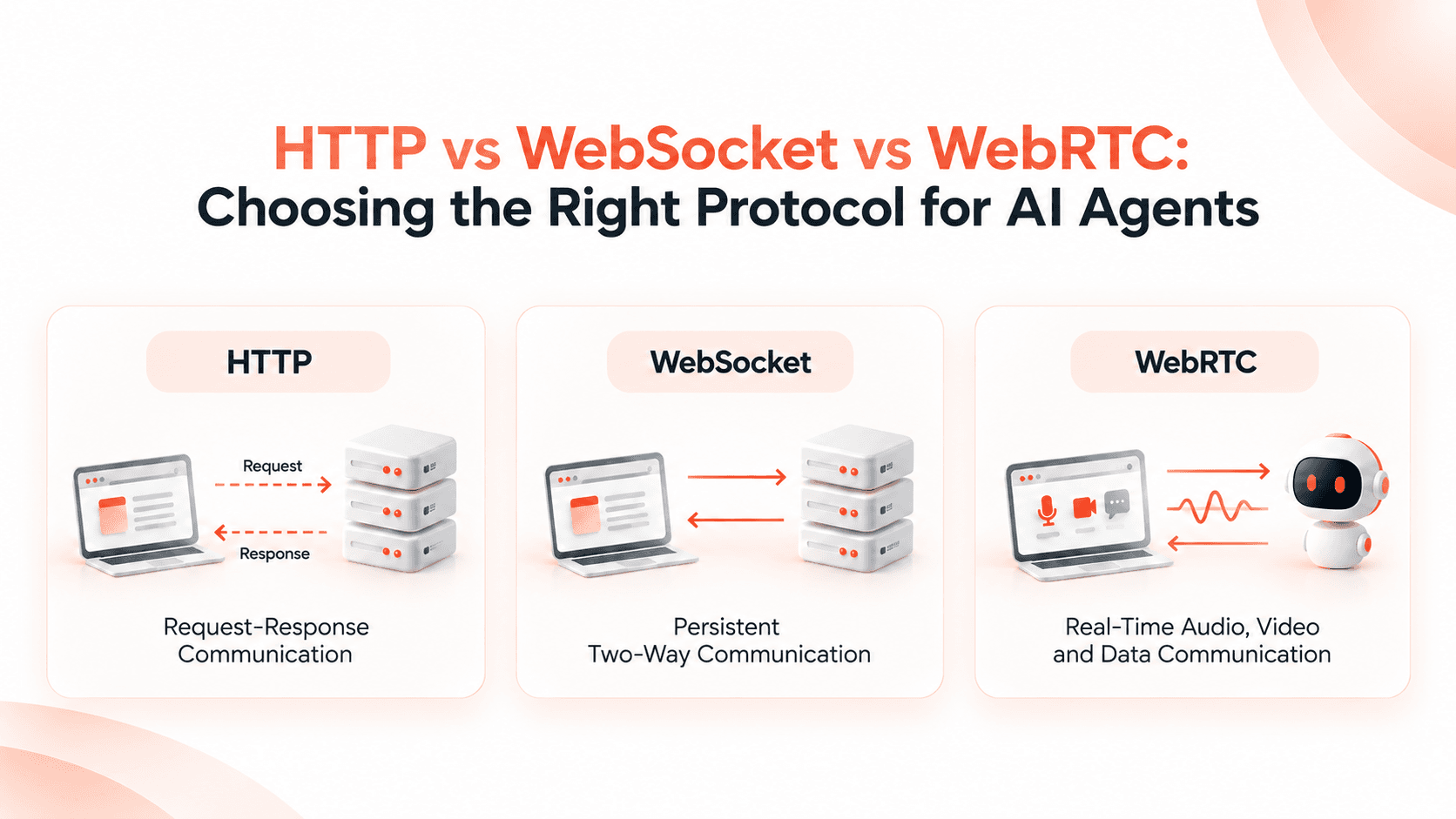
WebSocket provides a persistent, bidirectional connection between a client and a server. Once connected, both sides can send messages independently, making it useful for applications that need real-time updates.
In this guide, we explore how WebSockets work, how they compare with HTTP and Socket.IO, how to build a WebSocket server with Node.js, and the security practices developers should follow in production.
What Is a WebSocket?
WebSocket is a communication protocol that enables two-way communication between a client and a server over a single, persistent connection. It is standardized by RFC 6455 and is commonly used by web applications that need frequent or immediate updates.
With ordinary HTTP requests, a client usually sends a request and waits for a response. A WebSocket connection allows the server to send a message whenever an update is available, without requiring the client to initiate a new HTTP request for every message.
- •Persistent connection: The connection remains open until it is closed or interrupted.
- •Bidirectional communication: Both the client and server can send messages.
- •Low-latency updates: Messages can be exchanged without a new HTTP request for every update.
- •Text and binary data: Applications can exchange different kinds of message payloads.
- •Efficient real-time communication: A useful option when updates happen frequently.
How WebSockets Work
A WebSocket connection typically begins with an HTTP handshake. The client requests an upgrade to the WebSocket protocol, and the server accepts the upgrade if the request is valid and the server supports it. After a successful handshake, communication continues using the WebSocket protocol.
Step 1: The Client Requests a Connection
The browser or application connects to a WebSocket endpoint, commonly using a URL beginning with ws:// or wss://. The secure wss:// scheme should be used for production connections over TLS.
Step 2: The Server Accepts the Upgrade
The server validates the handshake and can upgrade the HTTP connection. If the upgrade succeeds, the connection switches to the WebSocket protocol.
Step 3: Both Sides Exchange Messages
After the connection is established, either side can send messages. The client does not need to make a separate HTTP request every time it wants to send or receive a message.
Step 4: The Connection Closes
Either side can initiate a graceful closing handshake. Applications should also handle unexpected disconnections, timeouts, and reconnection attempts.
Remember: WebSockets provide a communication channel, not a complete messaging system. Authentication, message validation, persistence, delivery guarantees, and reconnection behavior depend on your application and libraries.
WebSocket vs HTTP
HTTP and WebSockets serve different communication needs. HTTP is a natural choice for fetching resources, submitting forms, and building REST APIs. WebSockets are useful when clients and servers need to exchange ongoing messages over a persistent connection.
| Feature | HTTP | WebSocket |
|---|---|---|
| Communication | Request-response | Bidirectional messaging |
| Connection model | Requests are handled individually | Persistent connection |
| Server-initiated updates | Requires another mechanism, such as polling or server-sent events | Supported through the open connection |
| Overhead | HTTP request and response headers for each request | Frames sent over an established connection |
| Best suited for | APIs, pages, forms, and resource retrieval | Chat, interactive apps, and live dashboards |
| Connection management | Usually straightforward request handling | Requires connection lifecycle management |
Choose HTTP when the application mainly needs conventional request-response operations. Choose WebSockets when ongoing, two-way messaging is a central requirement. Server-Sent Events can also be suitable when updates flow primarily from the server to the client.
Key Features of WebSockets
WebSockets provide several capabilities that make them useful for interactive applications and real-time systems.
- •Full-duplex communication: The client and server can send messages independently.
- •Persistent connections: Applications can exchange multiple messages without establishing a new connection for each one.
- •Low-latency delivery: Messages can be sent as soon as the application has data to share.
- •Text and binary frames: The protocol supports text and binary message payloads.
- •Reduced polling: Applications can avoid repeatedly requesting updates when a persistent connection is more appropriate.
- •Protocol standardization: WebSocket behavior is defined by a widely adopted standard.
Common WebSocket Use Cases
WebSockets are especially useful when information changes frequently and users need to see those changes without manually refreshing the application.
1. Live Chat and Messaging
Messaging applications can use WebSockets to deliver new messages, typing indicators, and online-status changes while users keep a conversation open.
2. Real-Time Notifications
Web applications can notify users about new activity, task updates, approvals, or important events as they occur.
3. Live Dashboards
Monitoring dashboards can receive changing metrics, application events, and operational updates through an ongoing connection.
4. Collaborative Applications
Shared editors and collaboration tools can broadcast user actions or document changes to connected participants. Conflict resolution and synchronization still require application-level logic.
5. Order and Delivery Tracking
An application can push order-status changes or delivery updates to users without requiring them to refresh the tracking page repeatedly.
6. Multiplayer Games
Multiplayer games can exchange player actions and state updates through persistent connections. Real-time performance also depends on server architecture, message frequency, and network conditions.
WebSocket vs Socket.IO
WebSocket is a protocol, while Socket.IO is a communication library that provides event-based messaging and additional application features. They are related, but they are not interchangeable.
| Feature | Native WebSocket | Socket.IO |
|---|---|---|
| What it is | A communication protocol | A real-time communication library |
| Messaging | WebSocket messages and frames | Named events and event payloads |
| Reconnection | Must be implemented by the application | Provides reconnection support |
| Rooms and namespaces | Must be implemented separately | Built-in features |
| Transport support | WebSocket protocol | WebSocket and supported fallback transports |
| Best suited for | Direct protocol-level control | Applications needing built-in real-time features |
Use native WebSockets when you want direct protocol-level control and are comfortable implementing the application behavior you need. Consider Socket.IO when features such as rooms, event-based messaging, acknowledgements, and reconnection support are valuable.
Important: A Socket.IO client cannot connect directly to an ordinary WebSocket server. The client and server must use compatible protocols and libraries.
Building a WebSocket Server with Node.js
Node.js can run a WebSocket server using packages such as ws. The ws package provides a straightforward API for accepting connections, receiving messages, and sending responses.
Step 1: Install the Package
Create or open a Node.js project and install the ws package:
npm install wsStep 2: Create the WebSocket Server
Create a file named server.js and add the following basic server implementation:
const WebSocket = require("ws");

const server = new WebSocket.Server({
  port: 8080,
});

server.on("connection", (socket) => {
  console.log("Client connected");

  socket.send("Connected to the WebSocket server");

  socket.on("message", (message) => {
    const text = message.toString();

    console.log("Received:", text);

    socket.send(
      JSON.stringify({
        type: "message",
        data: text,
      })
    );
  });

  socket.on("close", () => {
    console.log("Client disconnected");
  });

  socket.on("error", (error) => {
    console.error("WebSocket error:", error.message);
  });
});

console.log("WebSocket server running on port 8080");
This example creates a server on port 8080. When a client connects, the server sends a welcome message. Incoming messages are converted to strings and returned as JSON. Each connection also handles disconnection and errors.
Step 3: Connect from a Browser
A browser can connect to the server using the native WebSocket API:
const socket = new WebSocket("ws://localhost:8080");

socket.addEventListener("open", () => {
  console.log("Connected");

  socket.send("Hello from the browser");
});

socket.addEventListener("message", (event) => {
  console.log("Server response:", event.data);
});

socket.addEventListener("close", () => {
  console.log("Connection closed");
});

socket.addEventListener("error", (event) => {
  console.error("WebSocket connection error", event);
});
Run the Node.js server and open the browser code from a local page. The browser should connect, send a message, and receive the server's response. Use a secure wss:// endpoint when deploying the application over HTTPS.
Step 4: Prepare for Production
The example is intended for learning, not as a complete production server. Before deploying, implement authentication, authorization, input validation, message-size limits, rate limiting, safe connection handling, and monitoring. Also plan how persistent connections will work behind your reverse proxy or load balancer.
WebSocket Security Best Practices
A persistent connection introduces security responsibilities that must be addressed throughout its lifecycle. Protect both the initial handshake and the messages exchanged after the connection is established.
- 1Use WSS: Encrypt traffic with TLS in production.
- 2Authenticate connections: Verify the user's identity using a suitable authentication mechanism.
- 3Authorize every sensitive action: A successful connection should not grant unrestricted access to every message or resource.
- 4Validate message payloads: Check data types, formats, permitted actions, and payload sizes.
- 5Validate browser origins: Apply an appropriate Origin allowlist when accepting browser-based connections.
- 6Apply rate limits: Limit excessive messages, connection attempts, and concurrent connections.
- 7Protect credentials: Avoid placing long-lived secrets in URLs or exposing them in logs.
- 8Handle disconnections safely: Set suitable timeouts and ensure reconnect attempts cannot overwhelm the service.
- 9Monitor activity: Track connection counts, errors, message rates, and suspicious behavior.
For sensitive applications, also consider session expiration, token renewal, permission changes during an active connection, and how to revoke access without waiting for a connection to close naturally.
Advantages and Limitations
Advantages
- •Enables two-way communication over a persistent connection.
- •Supports timely delivery of application updates.
- •Reduces the need for repeated polling requests in suitable workloads.
- •Works well for interactive experiences and frequent messaging.
- •Can support both text and binary data.
Limitations
- •Open connections consume server and network resources.
- •Scaling across multiple instances may require a shared messaging or broadcasting strategy.
- •Reconnection and recovery behavior require careful design.
- •Message delivery, ordering, and persistence are not automatically guaranteed by the application protocol.
- •Security and authorization must be enforced throughout the connection lifecycle.
WebSockets are not automatically the best choice for every feature. Evaluate the update frequency, communication direction, infrastructure, reliability needs, and implementation complexity before choosing a solution.
Frequently Asked Questions About WebSockets
What is a WebSocket used for?
WebSockets are used for applications that need ongoing, two-way communication, such as chat, live notifications, collaborative tools, multiplayer games, and real-time dashboards.
Are WebSockets faster than HTTP?
WebSockets can reduce messaging overhead and latency for ongoing communication because a new HTTP request is not required for every message. HTTP remains a better fit for many ordinary request-response operations.
What is the difference between ws:// and wss://?
ws:// identifies a WebSocket connection without TLS, while wss:// identifies a WebSocket connection secured with TLS. Production applications should generally use wss://.
Can Node.js run a WebSocket server?
Yes. Node.js can host WebSocket servers using packages such as ws, or use Socket.IO when its additional communication features are needed.
Is Socket.IO the same as WebSocket?
No. WebSocket is a protocol, whereas Socket.IO is a library with its own protocol and additional features such as event-based messaging, rooms, and reconnection support.
Do WebSockets automatically save messages?
No. WebSockets provide a communication channel. Applications that need message history, durable storage, delivery acknowledgements, or replay must implement those features separately.
Conclusion
WebSockets are an effective choice for applications that need continuous, bidirectional communication between clients and servers. Understanding the handshake, connection lifecycle, message handling, and security requirements helps developers build reliable real-time features.
Start with a small Node.js server, test communication from a browser, and then add authentication, validation, monitoring, and scaling strategies before production deployment. Choose native WebSockets or a library such as Socket.IO according to your application's requirements.
Building real-time features for your next application? Explore how HireStar.io approaches modern technology and software solutions. Talk to our team